
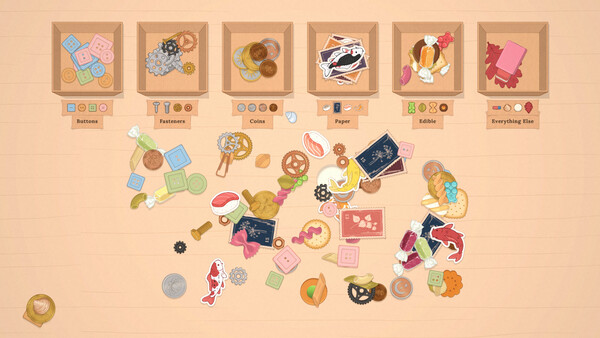
Reduce repeated dragging with release-build piles, then use Spread Out and movable boxes when the last object is buried or far away.
Build a pile by placing matching items together, wait for them to settle, then carry the pile to the correct box as one unit. Use Spread Out from the pause menu when objects overlap and the remaining piece is hidden. Both tools belong to the full release and were introduced specifically to reduce the demo's repeated-drag problem.
- Group only matching items and let the stack settle.
- Move the completed pile to its destination as one unit.
- If an item is hidden or overlapping, pause and use Spread Out before dragging at random.
A safe pile workflow
Start with a pair of obvious matches, not every vaguely similar item. Place them close together and watch for the pile to settle. Add another confirmed match only after the group is stable. The developer's notes stress that objects do not automatically attach to the cursor; the player creates the group, then moves it.
Once the pile is ready, lift it and drop it over the correct labeled box. The full-version notes say a box accepts the whole pile, avoiding the old behavior where one item entered and the others scattered. If a loose object is thrown toward a pile, its inertia is damped so it should land nearer the target, but controlled placement remains safer for an ambiguous piece.
Use movable boxes before repetitive work
Boxes are not locked to their original position. Drag one by its label and place it near the part of the desk you are processing. The whole container row can also be pulled closer. This is a practical control, not decoration: moving the destination once can eliminate many long mouse drags.
Do not put unlike objects into one pile merely to move them faster. The game has no timer, so a mixed pile creates more correction work without any scoring benefit. Keep an “uncertain” area until the note or labels resolve the category.
Find the last hidden object
If one item appears to be missing, open the pause menu and choose Spread Out. The release notes say it opens up what remains on the table, separating overlapping pieces. Check the table edges and newly exposed spaces before restarting.
Spread Out is a visibility reset, not an automatic solver. It does not decide which box is correct. If the remaining item is visible but the category is unclear, return to the client's note and printed labels. If no item appears and the order remains impossible in the current build, capture the desk and order details for the official forum.
For the complete first-order sequence, use the beginner guide. If the desk asks for rows or reconstruction rather than boxes, open order types.
Sources & evidenceOpen the references used for this page
QUICK ANSWERS
Questions players ask next
How do I make a pile in The Sorting Bureau?
Place several matching items next to each other and let them settle. The developer says the pile is then picked up and carried as one object.
Where is Spread Out?
The full-version announcement places Spread Out in the pause menu.
Can a whole pile go into a box?
Yes. Drop a matching pile over the correct box; the release notes say all items enter together instead of scattering.
HELP SHAPE THE NEXT UPDATE
Missing an answer—or found something outdated?
Send the exact game problem, platform, and version. Corrections are reviewed before expansion requests.