
Stack Haven demo
Stack Haven Demo Guide — First Stacks and Automation Test
A reproducible Stack Haven demo route: make one official stack example work, repeat it, then automate only the loop you have observed.
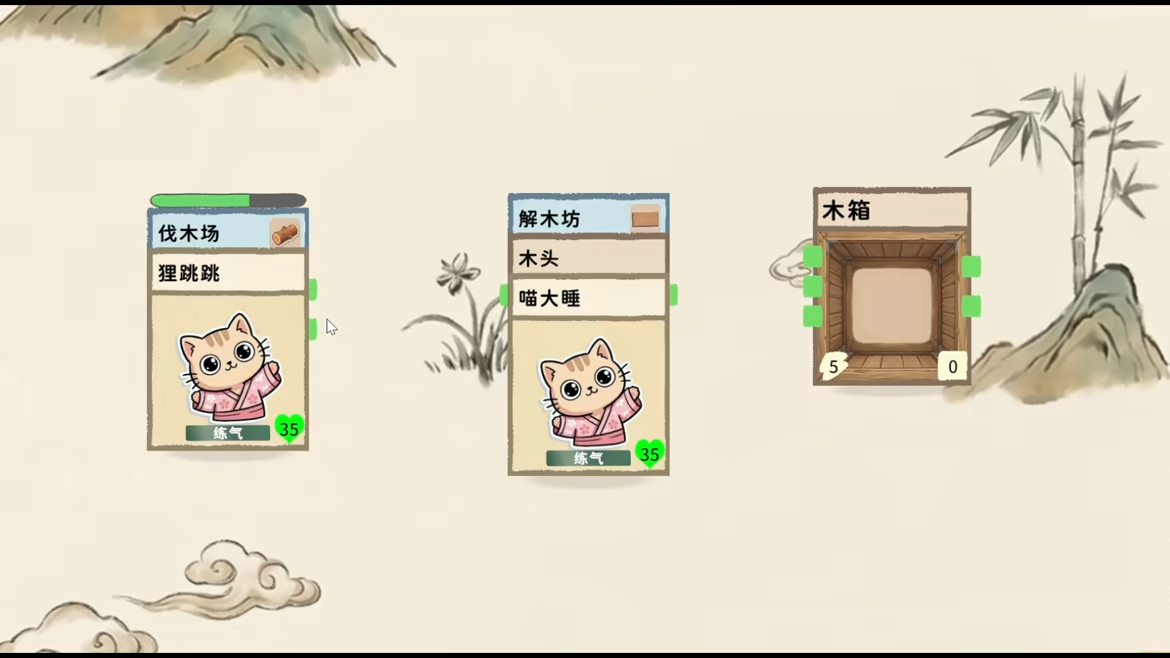
Stack Haven demo: a safe first automation route
Test one official stack interaction twice, then connect one channel and observe a complete cycle. Steam confirms that sprites can be stacked with trees to gather wood and stone piles to mine stone; it also says channels can automate production. It does not confirm a single best opening layout, so the right first route is a small loop you can see and repeat.
1. Choose the smallest visible input pair
Open the demo and find one official example that is actually present in your build. A sprite plus a tree is the clearest gathering example; a sprite plus a stone pile is the equivalent mining check. Place only the cards the UI identifies, wait for the interaction to resolve, and copy the exact output name from the interface.
Do not use an older screenshot to rename an item. Stack Haven’s store page has been updated repeatedly, and its June notes mention new systems and localization work. A guide should match the card labels a player can currently see.
2. Repeat it before calling it a loop
Perform the same stack a second time and note four things:
| Check | Record | | --- | --- | | Input | Sprite and object cards used | | Result | Exact resource or state change | | Timing | Immediate, timed, or blocked result | | Requirement | Any tooltip, energy, location, or panel condition |
If the second result differs, keep both observations. It may be a deliberate creature preference, a resource condition, or a demo-specific rule; none should be silently converted into a universal recipe.
3. Add one channel, then stop and inspect
The official page says simple channel connections can create automated production lines from basic farming and cooking to alchemy and artifact crafting. Connect the output from your proven action to one destination only. Watch until the input is collected and the output arrives. If it stalls, record the source, destination, arrow direction, and visible warning before rearranging the whole board.
This is the useful difference between “automation exists” and a guide players can act on: the first gives a promise; the second gives a recoverable test. When that single connection works, expand one dependency at a time.
4. Save the result for the next update
The public page currently lists Stack Haven as coming soon, and the developer has posted regular system updates. Put the date and current demo build next to each proven loop. When an update changes a card, you can retest the same inputs instead of rebuilding a guide from memory.
For the feature boundary and the next research questions, return to the Stack Haven guide.
Sources
Quick answers
What is the easiest Stack Haven stack to test first?
The official Steam page names sprite plus tree for gathering wood and sprite plus stone pile for mining stone. Start with the interaction that is visible in your demo build.
Should I build a large Stack Haven automation layout immediately?
No. The official description confirms channels can automate production, but it does not give a fixed early layout. Verify one production cycle and one destination before adding another link.
What should I record after a Stack Haven demo interaction?
Record the build/date, each card or sprite used, the visible action, output, destination, and any tooltip or error message. This makes a later update checkable.