
Hearth and Hamlet beginner guide
Hearth and Hamlet Beginner Guide — Demo to Launch Prep
A practical first-session checklist for learning the demo systems and carrying reliable notes into the August 19 full release.

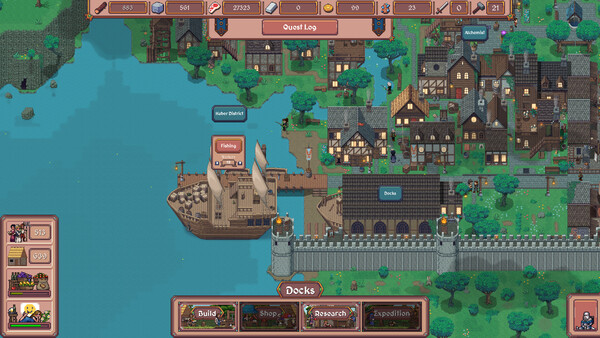
This Hearth and Hamlet beginner guide is for players using the demo before the August 19, 2026 release. The aim is not to publish a fake “best build.” The developer's June 15 patch notes explicitly changed buildings, gold access, research, worker quantities, research rewards, combat, UI scaling, and save compatibility. A careful note-taking routine is more useful than an old spreadsheet with unknown build numbers.
1. Establish a clean baseline
Before clicking through the opening, write down the date, platform, visible game version, display resolution, and whether the save is new. Take one screenshot of the settlement overview and one of the research panel. If the game offers UI scaling or a Steam Deck preset, note the selected option. The June patch added automatic or manual UI scaling, so screenshots from different settings may not be directly comparable.
2. Learn the worker loop
The store describes a resource loop built around food, wood, stone, and gold, with workers assigned to production. Start with the assignment the tutorial recommends, then watch which resource becomes the first visible constraint. Record the worker count, the resource output shown by the current UI, and the time or condition attached to the next building. Do not infer a permanent ratio from one short demo session; the official patch says worker quantities were adjusted for pacing.
Once the first construction is moving, change one assignment and wait for the interface to show the result. This is a simple way to learn whether the current build rewards faster construction, more food, or extra storage without pretending that one choice is universally optimal. Keep the before-and-after screenshots together with the build number.
3. Treat research as a map, not a checklist
The official listing says research permanently unlocks buildings, technologies, policies, and magic. The demo patch adds that several research options and Advisor research became available, with Advisor research unlocked through the Leader's Hut or Manor. Use those names to orient yourself, but verify the exact unlock tree in the current client. A node label or cost can change without changing the overall system description.
For each early research choice, record three things: the prerequisite shown, the resource cost shown, and the practical effect after the unlock. If an option is locked, capture the reason rather than filling in a guess. That makes the launch-day comparison useful when the full build replaces, renames, or rebalances a branch.
4. Test settings and save behavior
The June patch notes mention independent music, sound-effect, and UI-volume controls, improved resolution options, helper-arrow visibility, and Shift + F11 to hide the UI. Test one setting at a time and keep the screenshot that proves it changed. The same patch warns that older demo saves were incompatible after the backend update, so back up nothing as if it will survive the full release; treat the demo as a disposable learning environment.
Launch-day handoff
On August 19, start a fresh save and repeat the baseline screenshots. Compare names and conditions, not just numbers. If the opening worker count, research tree, gold timing, or storage prompt changed, publish the new observation with the full-build version and keep the demo note dated. That is the evidence needed for a reliable first-session route later.
Sources
- Hearth and Hamlet on Steam
- Hearth and Hamlet official June demo patch notes
- Hearth and Hamlet demo on Steam
Quick answers
Should I follow a fixed build order in the Hearth and Hamlet demo?
No. The developer has changed worker quantities, research rewards, buildings, and combat in the demo patch notes, so record the current UI and use the first visible bottleneck instead of copying an old cost table.
What should I record before the full release?
Record the build number, starting resources, worker assignments, first research unlock, storage prompt, and any policy or UI-scaling setting you test.