
Inspection procedure
Security 51 Inspection Guide — Papers, X-Ray and Mental State
Use a controlled inspection checklist instead of guessing which visitor is dangerous, with each decision tied to visible evidence and the current build.
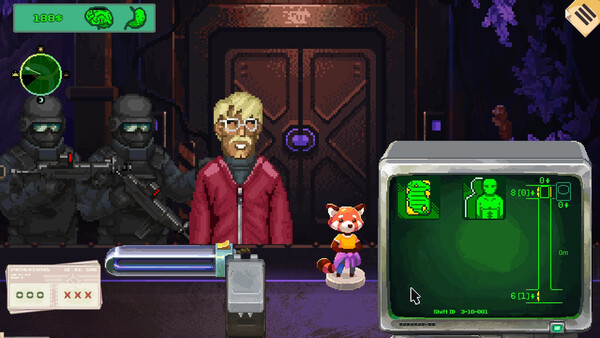
The safest Security 51 inspection guide is a checklist that preserves evidence. The official store describes document verification, photos, X-ray inspection, internal checks, and difficult decisions at the elevator. It does not publish a complete visitor answer key, so the route below is designed to make your own current-build findings reproducible.
The five-part visitor record
| Record | Write down | | --- | --- | | Identity | Name, role, and the exact clearance or pass text shown | | Documents | Number mismatches, invalid dates, or warning text visible in the UI | | Physical inspection | X-ray, bones, organs, temperature, or skin result as displayed | | Decision | Admit, deny, hold, or the action label the current shift provides | | Consequence | Elevator result, alert, mental-condition change, and build number |
The point is to keep a document mismatch separate from a biological anomaly. If both are present, record both instead of collapsing them into “suspicious.” That distinction is what lets a later page answer a real search question without inventing a universal rule.
When to use deeper tools
The store listing confirms the existence of X-ray and deeper examinations, but not a fixed scan order. Use the current shift instruction as the gate. If the UI asks for a photo or X-ray, capture the label and result; if it does not, do not spend a test run assuming that every visitor needs every tool.
The demo update is useful historical context: it mentions incorrect passport or pass numbers, fake medical certificates, and a Start Day button introduced in version 0.0.1.105. Those clues suggest the kinds of evidence the game cares about, but they are not proof that the launch build uses identical wording or timing.
Mental condition without a fake formula
The official description says the officer must maintain mental condition and eat enough. That confirms a survival or operator-state layer, not its exact thresholds. Take a screenshot before a difficult decision, complete one action, and capture the display again. Repeat with one changed variable before describing a cause-and-effect rule.
What this page will add next
- a current-build document mismatch table;
- an anomaly catalogue with screenshots and the exact tool used;
- a versioned elevator decision log;
- ending conditions only after a save-state test can reproduce them.
Sources
Quick answers
What should I check first in Security 51?
Start with the current instruction and the visitor’s documents, then use the inspection tools the shift makes available. The public listing does not establish one universal order for every shift.
Should every visitor receive an X-ray?
The store confirms X-ray and deeper inspection systems, but it does not publish a rule that every visitor should be scanned. Record when the current shift asks for it.
How do I know if a mental-state change is caused by my decision?
Capture the mental-condition display before and after one decision while holding the rest of the inspection constant. A single run cannot prove a hidden formula.